CoolSculpting applicators: how to match heads to a console
A matching and verification guide for clinic owners and biomedical teams buying applicators for a CoolSculpting system, current as of September 2026. It contains no treatment claims and no clinical guidance. Applicators are the…
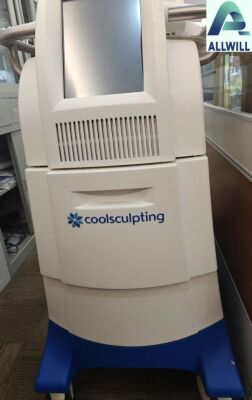
A matching and verification guide for clinic owners and biomedical teams buying applicators for a CoolSculpting system, current as of September 2026. It contains no treatment claims and no clinical guidance.
Applicators are the most expensive consumable in a cryolipolysis practice and the component most likely to be mismatched. A console and its applicators are designed as a system: the console’s software determines which applicator types it supports, and an applicator that physically attaches may still be outside that set. Buyers who treat applicators as generic accessories discover the problem when a treatment cannot be started.
Why an applicator is console-specific
Two things tie an applicator to a console. The physical interface ¡ª the connection, the vacuum and the cooling path ¡ª determines whether it can be attached. The software determines whether the console recognises and controls it. Both conditions have to be met, and only the first is visible from a photograph.
That is why the matching question is answered from documentation rather than from a picture: which applicator types does this console’s software version support, and which of those is this specific applicator?
Applicator families
Cryolipolysis systems have been sold with several applicator families over their product life, and the families differ in the treatment areas they are designed for and in the console generations they belong to. Rather than reproducing a catalogue here ¡ª the families and their supported combinations change with software releases ¡ª the buyer’s task is to establish three things for any applicator on offer:
- Its exact part number and, where present, its generation marking.
- The console models and software versions its manufacturer documentation lists it for.
- Whether the consumable items it requires are still available.
Establish those three from the manufacturer’s documentation and you have a verified match. Establish them from a listing description and you have a hope.
Console generation compatibility
| Check | Where to read it | What it decides |
|---|---|---|
| Console model and software version | Startup screen and device labeling | Which applicator types the system supports |
| Applicator part number | Applicator label | Which family and generation it belongs to |
| Supported combination | Manufacturer documentation for this console version | Whether the pairing is within the supported set |
| Consumable supply | Current accessory catalogue | Whether the applicator can be used and maintained |
Where the console has been updated, the software version matters more than the model name. A console running an older version may not support an applicator that a newer version does, and updating a console is not always a decision the clinic controls.
Verifying a match before purchase
- Record the console model, serial and software version from the device.
- Read the applicator’s part number and any generation marking from its own label.
- Check the manufacturer’s documentation for the supported combinations at that software version.
- Confirm that the consumables the applicator needs are obtainable.
- Ask the seller to confirm, in writing, which console the applicator was used with.
- Verify the pairing on the console before the applicator enters routine use.
Consumables and accessories around the applicator
An applicator is not used on its own. Each treatment consumes a set of items ¡ª protective interfaces, positioning materials and the straps or securement that hold the applicator in place ¡ª and a used applicator purchase is only complete if those items are obtainable. This is a procurement question rather than a technical one, and it is worth answering before price is discussed.
For each applicator you consider, establish four things. Which consumable items it requires, with part numbers rather than descriptions. Whether those items are currently supplied, and through which channel. Whether they carry their own shelf lives and storage conditions. And whether the clinic’s existing stock of consumables suits the applicator family being purchased, because moving between families can strand consumable inventory the clinic has already paid for.
The same logic applies to accessories that are not consumables: the cables, connectors and positioning hardware that travel with a system. Where a purchase includes them, list them by part number against the applicator and the console. Where it does not, price them, because a single missing connector can prevent an applicator from being used at all ¡ª and buying one in isolation from the secondary market is rarely as simple as buying the applicator itself.
Finally, decide the maintenance position. Applicators are serviced by qualified providers, and the availability of that service in your region is part of the applicator’s value. A family of applicators that cannot be serviced locally is a family with an expiry date that is set by its first fault rather than by its design life.
Used-applicator condition checklist
- Housing and cup: cracks, deformation or damage to the sealing surfaces.
- Cable and connector: strain damage, bent pins, damaged insulation.
- Labels: part number and serial present and legible.
- Vacuum and cooling interfaces: wear, contamination or missing components.
- Service history: whether the applicator has been serviced, and by whom.
Condition findings have a commercial consequence: applicators are individual capital items, and a damaged one cannot be replaced by substituting a different family. Price the replacement before you decide that a discounted applicator is a bargain.
Questions buyers ask
Will an applicator from a different machine work on mine?
Only if the manufacturer’s documentation lists it as supported for your console model and software version. Physical attachment alone does not establish that.
Do we need to match applicators to a specific console, or to a model?
To the configuration ¡ª model plus software version. Two consoles of the same model can differ in what they support if their software versions differ.
What is the biggest risk in buying used applicators?
Condition, because the findings are not always visible in photographs, and because a failed applicator removes capacity rather than merely delaying a purchase. Verify on the console before the applicator enters routine use.
Match the applicator to the console’s configuration, then verify it in person. If you are buying applicators and want to know what documentation travels with them, ask HHG for the records on a specific applicator, or review the current CoolSculpting listing. Related reading: the second-hand aesthetic device buying guide.