Valleylab ForceTriad vs Force FX vs Force EZ
A buyer-oriented comparison as of September 2026. Verify every specification against the official Medtronic/Covidien documentation for the exact model and software version you are considering. ForceTriad, Force FX, and Force EZ are all Valleylab/Covidien…
A buyer-oriented comparison as of September 2026. Verify every specification against the official Medtronic/Covidien documentation for the exact model and software version you are considering.
ForceTriad, Force FX, and Force EZ are all Valleylab/Covidien electrosurgical generators, but the names describe different generations and sizes, not three versions of the same machine. Buyers who compare them on marketing language miss the real differences: output modes, vessel-sealing capability, accessory ecosystem, size, and service age. This guide tells you what to compare and how to verify it before you buy.
What the model names mean
- Force FX: A long-established full-size electrosurgical generator supporting monopolar and bipolar output with Valleylab’s adaptive REM return-electrode monitoring and Instant Response technology.
- Force EZ: A compact generator in the same family, designed for endoscopic and open procedures where a smaller footprint matters. It shares REM-style return-electrode monitoring and Instant Response behavior and offers cut and coagulation modes plus bipolar output.
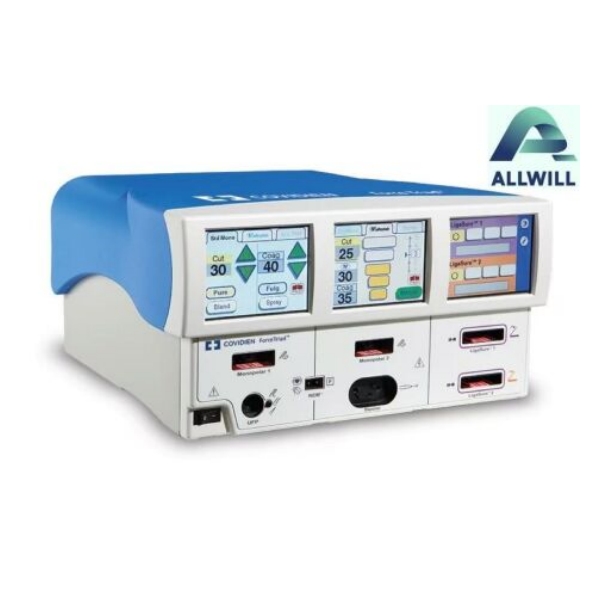
- ForceTriad: The newer full-featured platform that adds vessel-sealing (LigaSure) capability alongside monopolar and bipolar modes, with touchscreen controls and tissue-sensing technology. It is the largest investment of the three and supports a broader accessory ecosystem.
Model naming has shifted across Covidien and Medtronic eras, so always confirm the exact model, region, and software version from the label rather than relying on the listing title.
Compare on modes and outputs, not brand claims
| Comparison point | What to verify | Why it matters |
|---|---|---|
| Output modes | Monopolar cut/coag, bipolar, and vessel sealing (LigaSure) availability | ForceTriad adds vessel sealing; FX and EZ do not. If you need LigaSure, only ForceTriad-class platforms fit. |
| Physical footprint | Dimensions, weight, cart or boom mounting | Force EZ is the compact choice for endoscopic suites; full-size units suit OR towers. |
| Return-electrode system | REM-compatible patient return electrode support and accessory connectors | Your pad inventory and instrument connectors must match the generator. |
| Accessory ecosystem | Pencils, footswitches, forceps, LigaSure instruments | An older generator with a rich used-accessory market can be cheaper to run; a newer platform has broader capability but pricier consumables. |
| Service age and parts | Manufacturer support status, service manual availability, parts | Older models remain serviceable but replacement parts and board repairs become the constraint. |
Start with the procedure mix, then the platform
The fastest way to choose is to work backwards from what the generator must do in your rooms. Make the mode list first ¡ª monopolar only, monopolar plus bipolar, or monopolar plus bipolar plus vessel sealing ¡ª then let that list eliminate platforms before you compare price or condition.
| Typical setting and procedure mix | Platform that fits first | Why |
|---|---|---|
| General OR doing monopolar and bipolar electrosurgery; no vessel-sealing program | Force FX or a comparable full-size generator | Full-size features without paying for LigaSure capability you will not use |
| Endoscopy suites and clinics where cart space and mobility dominate | Force EZ (compact) | Smaller footprint and lighter unit fit procedure carts and crowded rooms |
| General, gynecologic, or colorectal cases using LigaSure vessel sealing | ForceTriad-class platform | Vessel-sealing output is the deciding capability; FX and EZ cannot cover it |
| Facility standardizing on one generator family across several ORs | Match the newest supported platform with existing accessories | Common connectors, training, and service reduce total cost across rooms |
Reading the official comparison sheet
Medtronic publishes a generator comparison document that places Valleylab platforms side by side on features, dimensions, and outputs. Ask the seller for the current official data sheet for the exact model instead of accepting a dealer’s summary. Two numbers matter most in that sheet for your decision: which output modes and vessel-sealing technologies the platform supports, and the connector/accessory list that matches your OR inventory. A generator with every mode you need is only useful if the pencils, footswitches, forceps, and LigaSure instruments you already own will connect to it.
The family did not stop at the three familiar names. The newer Valleylab FT10 is a general-purpose energy platform in the ForceTriad lineage, while the Valleylab LS10 is a LigaSure vessel-sealing generator rather than a general electrosurgery platform ¡ª it is not a substitute for a Force FX or ForceTriad in a room that needs the full cut and coag mode set. For a buyer, that is both a warning and an opportunity: a listing that says “Valleylab generator” may be any of several platforms with different jobs, and the model number on the nameplate, not the brand name, determines which modes, connectors, and service documents apply.
Used-market notes for each platform
- Force FX: The oldest of the three; the used market is deep, service records matter, and accessory compatibility should be confirmed model by model. Expect the largest age-related service questions.
- Force EZ: Compact and common in endoscopy; REM-capable configurations are typical, but verify the exact regional variant, its REM support, and the accessory connectors from the unit label rather than assuming every “EZ” configuration matches.
- ForceTriad: The highest-value used platform when records are clean; verify controller-board service history, recalibration after repairs, and self-test behavior because the platform has more electronics in play.
Verification checklist for any of the three
- Record the exact model, serial, and software version from the label.
- Obtain the official data sheet and service manual references for that version.
- Request serial-matched service records, including any board or battery replacement and the recalibration that followed.
- Ask for a live power-on and self-test demonstration; verify REM/accessory connections are recognized.
- Confirm parts availability and manufacturer support status for the model.
Questions buyers ask
Is ForceTriad always the right choice over Force FX or Force EZ?
No. If your procedures do not need vessel sealing, a compact Force EZ or a well-maintained Force FX can be the lower-cost fit. Choose the platform whose modes match your OR inventory, then compare condition and price within that platform.
Can I use ForceTriad accessories on a Force FX?
Only if the connector and the generator’s accessory list support them. Compatibility is model- and connector-specific; check the official documentation rather than assuming cross-model fit.
Does an older generator mean higher service risk?
Age raises the question, not the answer. A Force FX with clean, serial-matched service records can be lower risk than a newer unit with an empty history.
Match the platform to your procedure list first, then compare condition within the platform. If you want help comparing a ForceTriad against your current OR setup, send HHG your mode and accessory list ¡ª the team can point you to listings whose documentation supports the comparison. You can also review the current ForceTriad listing and its records directly. If your question is the safety program around the generator rather than the purchase itself, start with HHG’s electrosurgical generator safety and leakage-protection guide.